Table of Contents
If you’ve ever created an amazing piece of content and seen it quietly languishing on page five in the Google SERPs, there might not be anything wrong with your content. It could simply be that none of the other pages on your website link to it. This is exactly where internal linking in SEO becomes important. internal linking in SEO is the practice of connecting relevant pages within your website so search engines and users can easily discover your content. By using internal linking in SEO, you ensure that the pages you want to rank have a clear path for search engines to crawl and for visitors to navigate, creating a stronger website structure and improving the overall user experience.
While internal linking doesn’t get the attention backlinks and keyword research do, it’s one of the few SEO levers that you actually have full control over. You don’t have to spend money, time on outreach, or hope for luck to happen.
In this guide, we go over exactly how internal linking helps your SEO efforts, how to create your own internal linking strategy, common errors that silently cripple almost every website, and an actionable process you can apply to any website, large or small.
What is Internal Linking in SEO?
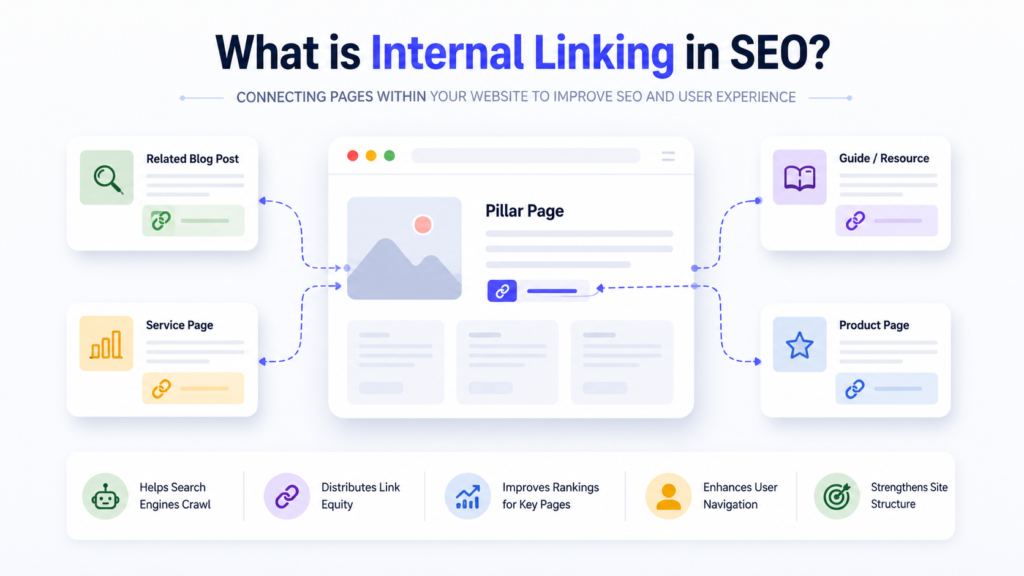
Internal linking in SEO can be described as a method of connecting pages on your website via hyperlinks. Unlike external links that connect to different websites, internal links will keep visitors (including search engine crawlers) within your own site.
- They help search engines discover pages, both existing and newly created through the process of crawling the website via links.
- They transfer authority (also known as “link equity”) from highly ranked and well-linked pages to the lesser-known or new pages.
- They direct users to related content and thus increase user interaction.
According to Google’s developers documentation, every page worth mentioning should have a link to it coming from at least one other page on the website, and the text used for the link (anchor text) should describe the linked page not only to people but also to Google.
Why Internal Linking is Critical for Website Structure SEO
Internal linking in SEO and website structure SEO go hand in hand. Internal linking in SEO helps create an organized website hierarchy with a homepage, category pages, and supporting articles that are logically connected. This structure makes it easier for search engines to understand the importance of each page and the relationships between different topics. By implementing Internal linking in SEO effectively, you improve both website navigation and search engine crawling, helping your most valuable content gain greater visibility.
Take libraries for example. In case books are randomly arranged without categories or signs, even a highly comprehensive collection is almost pointless. Internal links in SEO are the signs which tell visitors that, “If you enjoyed this, check out these pages next” and Google that, “The cluster of these pages is all about this topic”.
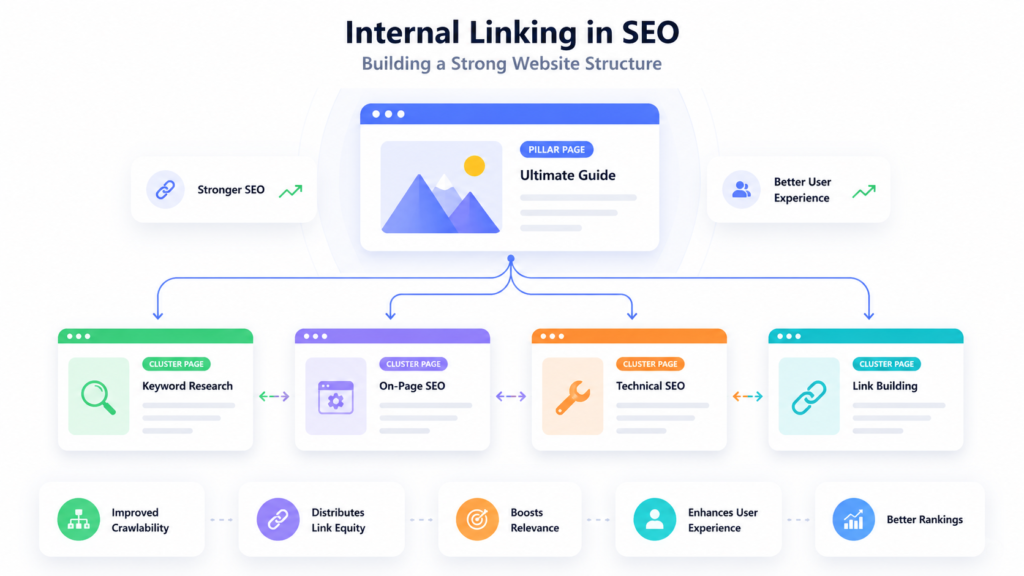
Websites that understand how to do this end up creating a common structure known as the hub-and-spoke model – there is a hub page which covers a general topic, while other supporting pages cover various subtopics that are linked to the hub page and among themselves.
Internal Linking Audit Of Existing Structure
Prior to implementing any changes, you should look at your current state and see what you have. That’s usually the step that many beginners (and even experienced SEOs) miss, but this is where you will find the most obvious loopholes.
The simple procedure:
- Mapping your key pages. Just write down the pages that are critical for your business, cornerstone guides, your services pages, and best blog posts.
- Finding orphaned pages. Orphaned pages are pages without any internal links leading to them. That means that they cannot be found by users navigating your website and, sometimes, even by the search engine crawler. You can find such pages using Google Search Console’s Links report or your website crawler.
- Checking your link distribution. Do your key pages receive the most internal links, or do they get completely ignored while the homepage absorbs all of the link equity?
- Analyzing anchor texts. Using such vague anchor texts as “click here” or “read more” doesn’t give you any chance to pass some rBe descriptive, not generic: The anchor text should tell you what the destination page is actually about – skip filler like “click here” or “this article.”
This type of audit is where a lot of problems with links inside the website become clear. We find pages that were made and then just left alone with no links to them from parts of the site. These internal linking problems are an issue. The website has pages that were published. Then nobody thought about them again and now they have zero links pointing back to them from anywhere else, on the website.
How to Select the Correct Anchor Text
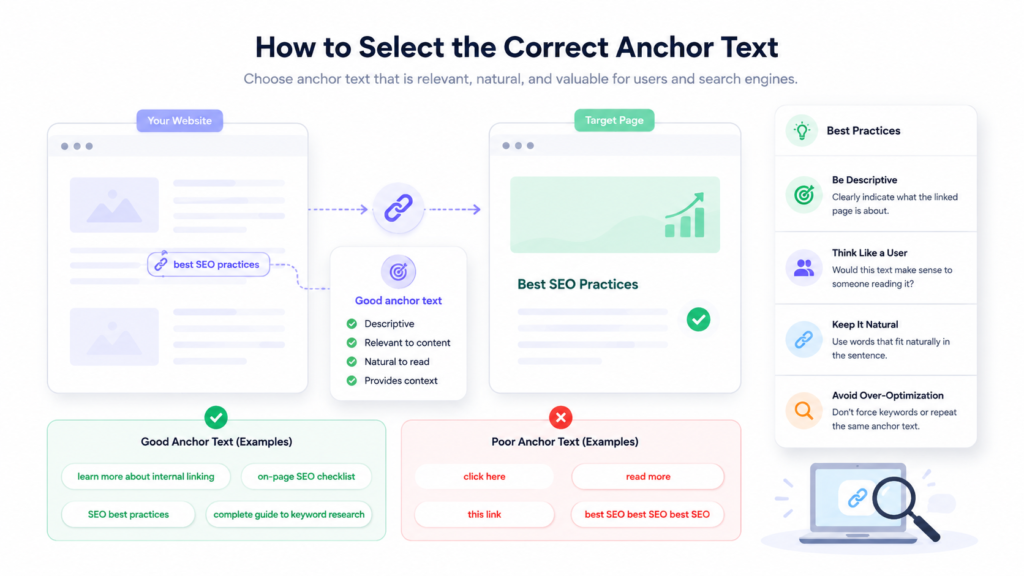
The anchor text is defined as the clickable part of the link and has more SEO importance than people would imagine. One should try to ensure that the anchor text describes what is found at the other end.
Be descriptive, not generic: The anchor text should tell you what the destination page is actually about – skip filler like “click here” or “this article.”
Natural is best: The anchor text should blend into the sentence, not sound like an SEO insertion.
Use different language When linking to the same page more than once, don’t use the same anchor text each time — it could look manipulative to search engines.
Don’t use exact match keywords in every link. Some branded terms, some partial matches, and some natural language. It just feels more real.
One of the best Internal linking in SEO practices is to avoid over-optimizing by using exact-match keywords in every single link. A healthy mix of branded, partial-match, and natural anchor text looks far more authentic to both users and search engines. For example, instead of writing “for more on this, click here,” write something like “our guide to Internal linking in SEO best practices covers this in more depth.” It reads naturally and gives both the reader and Google useful context about the linked page. Following these Internal linking in SEO best practices helps create a more user-friendly website while strengthening your overall SEO strategy.
Internal Linking Best Practices Checklist
| When we talk about linking it is really important to do it correctly. | Why internal linking in SEO matters to us is that it helps our website. |
| We should link from high-authority pages to our content. | This is because it passes link equity to the pages that really need to be seen. |
| We need to use varied anchor text. | This is good for our users. It also helps search engines understand what our website is about. |
| We should link to pages in a way that makes sense not just in the menus on our website. | The links that are in the context of what we’re talking about are more valuable for our websites search engine optimization than the links in the menus. |
| We should check for pages that are not linked to any page on a regular basis. | This is because we do not want our valuable content to be invisible to the search engines. |
| We should not link to every page from every page on our website. | If we do this it makes each individual link less valuable. |
| We should go back. Update our older posts with links to our newer and more relevant content. | This helps keep our website structure up, to date as we add content to it. |
Common Internal Linking Mistakes to Avoid
well-intentioned sites run into the same handful of problems:
- Orphaned pages. Content that no other page links to the result of publishing and moving on without circling back to connect it to related articles.
- Over-reliance on navigation links. Menu and footer links matter,. They don’t carry the same contextual weight as a link placed naturally inside relevant content.
- Generic anchor text. Phrases like “click tell search engines almost nothing about the linked page.
- Ignoring content. New posts often go live without being linked from your existing library of articles and older posts rarely get updated with links to new ones.
- Linking for the sake of linking. Adding links that’re n’t genuinely relevant to the reader just to hit a quota can hurt more than help.
A Simple Framework for Building an Internal Linking Strategy
If you’re starting from scratch here’s a process:
- Identify your cornerstone content. These are the pages you most want to rank. That represent your core topics.
- Group related content into clusters. Every supporting article should connect back to its cornerstone page. Where relevant, to sibling articles in the same cluster.
- Add links as you write. Than retrofitting links later look for natural opportunities to link to related pages while drafting new content.
- Revisit old content periodically. Every time you publish something check whether older posts should link to it.
- Adjust. Use a crawler or Search Console to check for orphaned pages or imbalanced link distribution then correct course.
FAQs
How internal links should a page have? Well there is no number of internal links that a page should have. The right amount of links really depends on the length of the content and how deep the content is. A good thing to keep in mind is that if it starts to feel like there are many internal links to a reader then it probably is too many internal links.
Do internal links actually improve the rankings of a website? Internal links do not directly improve the rankings of a website the way that strong backlinks can. Internal links do help search engines find and understand the content of a website, which indirectly helps the rankings of a website by making it easier for search engines to crawl the website and understand what the website is about.
Should I link from blog posts to new ones? Yes I should link from blog posts to new ones. Updating blog posts that are already indexed with internal links to new and relevant internal links is one of the fastest ways to help new pages get discovered by search engines and gain some authority.
What is the difference between links and external links?Internal links point to other pages on your own website, while external links point to pages on different websites. External links are commonly used to reference authoritative sources, whereas internal links help visitors and search engines navigate your site. A freelance digital marketing analyst in Kochi uses both types of links strategically to improve website credibility, user experience, and SEO performance.